Editor score 4.2 / 5
If the color, size, or printing on your England jersey order doesn't match the product page, don't pay again or arrange shipping right away. First save the page and order evidence, then check the variant, order draft, payment, QC entry, and warehouse status one by one. If payment has been made but the actual varian

If the color, size, or printing on your England jersey order doesn't match the product page, don't pay again or arrange shipping right away. First save the page and order evidence, then check the variant, order draft, payment, QC entry, and warehouse status one by one. If payment has been made but the actual variant can't be confirmed, pause all further actions and submit a single complete ticket to the shopping agent's official support.
First, identify which type of mismatch you're experiencing
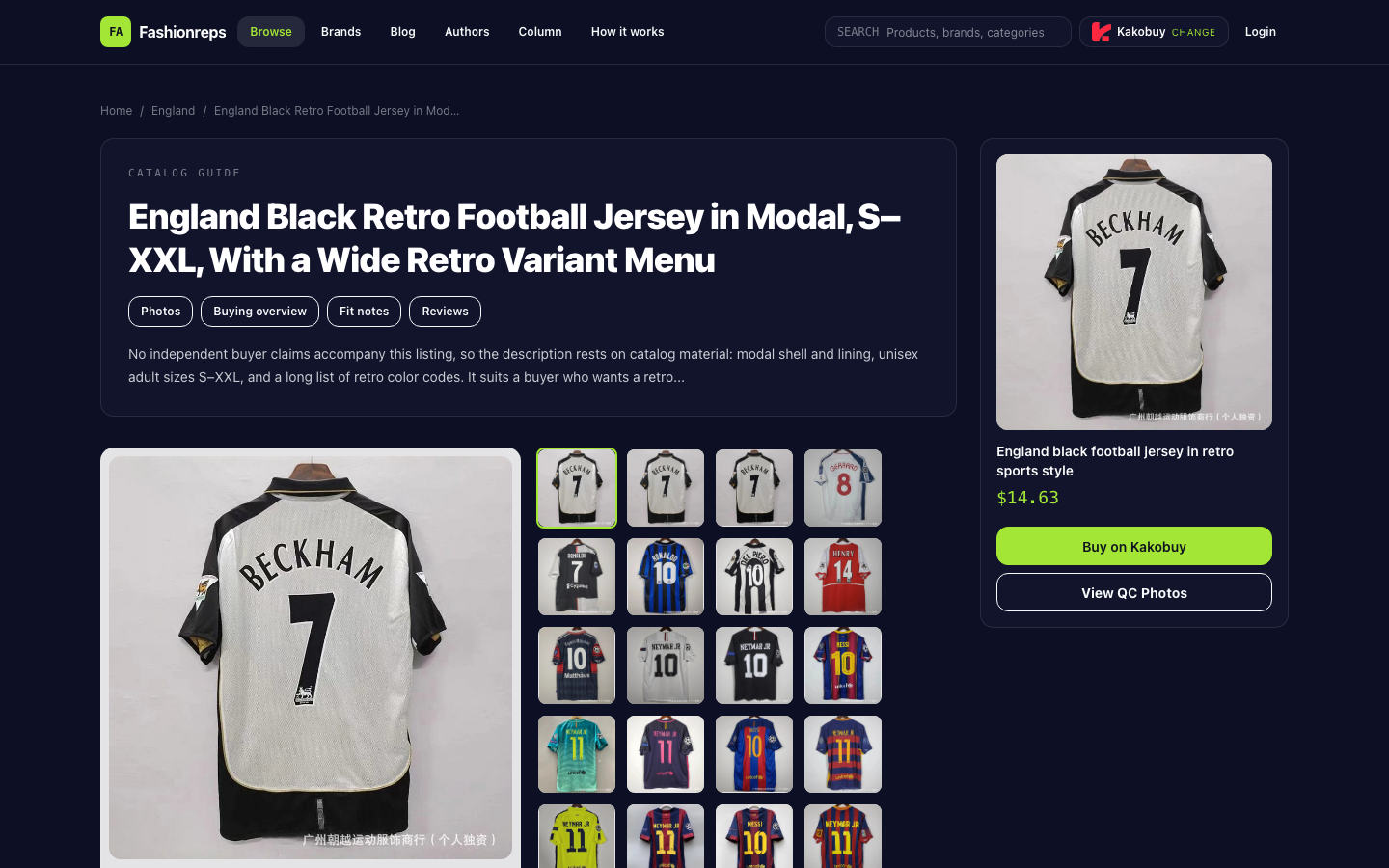
The product page info shows that this short-sleeve retro jersey uses modal fabric for the shell and lining, is listed as adult unisex sizes S, M, L, XL, XXL, and offers multiple retro color codes and player printing options. The page title says England black retro jersey, but the variant list also includes club styles like Manchester United, Liverpool, Juventus, Barcelona, Milan, Real Madrid, Arsenal, and others. Therefore, the title and main image alone can't prove that the order has actually selected the England black variant.
Common symptoms include:
- The product page title says England black, but the cart summary shows a different color code.
- After selecting a size, the order draft doesn't save the size or shows a different size.
- The variant shown on the page doesn't match the item summary in the payment record.
- The order has been charged, but no corresponding QC entry or warehouse status can be found on the page.
- The desired player printing, color code, or size doesn't appear in the order details.
Possible causes
The first possibility is mistaking the product title for the final variant. The page has a long variant menu, and the "England black" in the title does not mean the England black code has been selected. The second possibility is that the color codes don't correspond one-to-one with the product images or team names; you must rely on the final selected variant code and the order summary.
The third possibility is that the size selection wasn't saved in the order draft. The page lists only S to XXL and mentions a 5-unit measurement error range, but doesn't specify the unit or provide independent buyer fit feedback. So even if the order shows a size, you can't assume the actual chest or length will fit.
The fourth possibility is that payment, product purchasing, and warehouse QC are at different stages. The product page provides a QC Photos entry, but the current info doesn't prove that every order will have the same QC images, timing, or status. Don't treat the product page's reference information as proof of purchased, stocked, or inspected status.
Check in order, don't skip steps
1. Save original evidence
Before proceeding, save the following:
- The original product page URL.
- Screenshots of the product title, variant menu, and size selection area.
- The color code, team name, and player printing shown on the product page.
- The cart or order draft summary.
- The order number, payment status, and payment time.
- The QC entry, warehouse status, or error message shown on the page.
Screenshots should include full page context and time info; avoid using a cropped image that can't be traced to its source.
2. Check the product variant
Compare the actually selected color code, team, or printing on the product page with the cart summary item by item. Focus on confirming the following four items match exactly:
| Check item | What to confirm | What to do if unconfirmed |
|---|---|---|
| Color | Is it really the England black code, not another club's color code | Pause payment or purchasing; don't guess based on title |
| Size | Does the order summary show S, M, L, XL, or XXL | Confirm the actual variant with official support |
| Printing | Does the player name or number match the selection | Don't ask the seller to modify based on memory |
| Quantity | Does the order quantity match the cart | Pause duplicate ordering |
If the page only shows a color name without a clear code, don't use the image color as the official variant. If necessary, request flat measurements of chest and length for that size from the seller or shopping agent.
3. Check the order draft and payment status
Use the order number as the single thread. Check whether the order has been created, is pending payment, has been charged, and what item summary the payment record shows. Don't assume the original order failed just because the cart can still display the item.
If the payment status is unclear, save the payment page and transaction record, then confirm with official support. Don't click the payment button repeatedly, and don't cancel the original order and recreate it, to avoid duplicate orders or losing the original tracking number.
4. Check the QC entry and warehouse status
The product page info includes a QC Photos entry, but there is no independent buyer feedback or evidence that the current order has passed warehouse inspection. QC images can only be used for that order if the order page clearly links to the same order number, product variant, and warehouse status.
When checking, confirm whether the images can identify the color, size label, printing, and overall appearance. If the images don't correspond to the order, or show only generic product images, they cannot be used as QC evidence for that order. Also, don't treat AI-generated images or edited mockups as physical items, QC, or personal test evidence.
5. Note what still needs official confirmation
The following cannot be determined from the product page info alone:
- Whether the order has been successfully purchased from the seller.
- Whether the selected variant has been accepted by the seller.
- Actual stock, arrival time, and warehouse intake time.
- Whether the QC images belong to the current order.
- Eligibility for cancellation, model change, refund, or repurchase.
- Final service fees, international shipping, and other payment amounts.
These should be based on the shopping agent's order page and official support replies, not on the product page's reference prices or entry points.
When to contact official support
Submit a ticket through the shopping agent's official order support channel if any of the following occurs:
- Payment has been made, but the order summary has no clear color or size.
- The order summary doesn't match the variant selected on the product page.
- The order number exists, but the QC entry can't be linked to that order.
- You need to confirm whether you can change the model, cancel, refund, or repurchase.
- The warehouse status contradicts the order status.
The ticket should include the original product page URL, order number, product page screenshots, cart or order summary, payment status screenshot, and the specific question you want officially confirmed. For example: "Please confirm the color code, size, and printing for this order number; do not proceed with payment or shipping until the variant is confirmed." Don't submit the same ticket repeatedly when the result is unclear, and don't create multiple identical orders.
Conditions to stop operating
Stop repeating payment, rewriting orders, arranging shipping, or submitting duplicate purchase requests until the following are resolved:
- Payment has been made, but the actual color code cannot be confirmed.
- Payment has been made, but the order lacks clear size or printing information.
- There's a conflict between the product page and the order summary without official confirmation.
- QC images cannot be proven to belong to the current order.
- The order status, warehouse status, and payment record cannot be matched via the same order number.
If you need independent buyer fit feedback, clear fabric composition percentages, or confirmed official authorization, the current product info doesn't support those judgments. The page only clearly lists modal fabric, adult S–XXL sizes, a variant menu, and reference prices; final costs, inventory, shipping, order variants, and warehouse processing results still need to be confirmed by the shopping agent and seller's official records.