Editor score 4.2 / 5
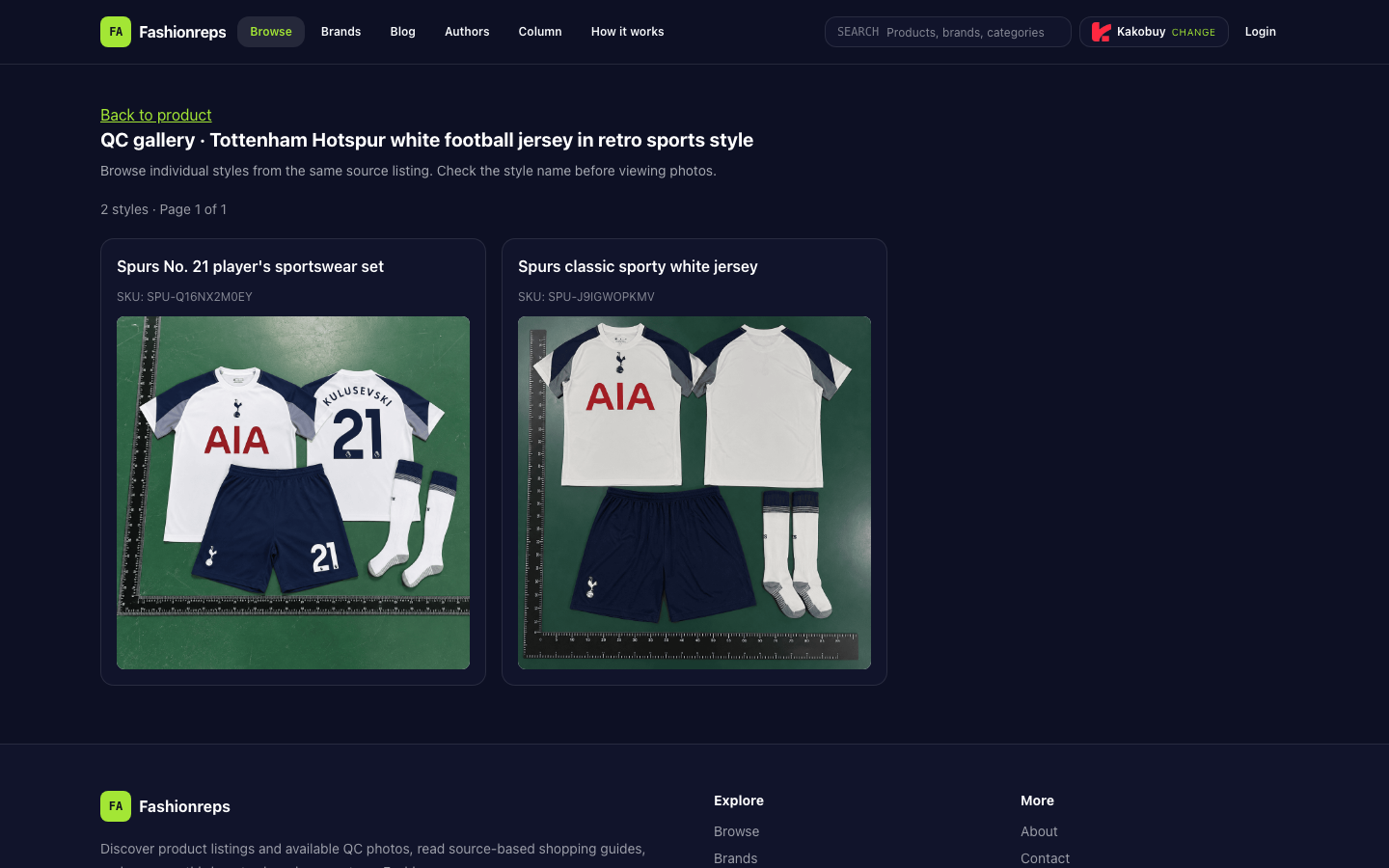
Bottom Line First When submitting a Tottenham Hotspur product link, the most important thing is not to first compare which agent is cheaper, but to confirm that the same original product information has not been misaligned across the catalog, ordering, and QC stages. Currently verifiable pages show that Fashionreps' corresponding QC page still recognizes that the product has 2 styles and provides entry points to
Bottom Line First
When submitting a Tottenham Hotspur product link, the most important thing is not to first compare which agent is cheaper, but to confirm that the same original product information has not been misaligned across the catalog, ordering, and QC stages. Currently verifiable pages show that Fashionreps' corresponding QC page still recognizes that the product has 2 styles and provides entry points to photos of different styles; however, public evidence is insufficient to prove that Kakobuy or other agents will fully preserve this style information. Therefore, before payment, you should cross-check the original link, brand, color, size, style name, and QC entry point item by item.

Step 1: Confirm the Product Identity on the Catalog Page First
After opening Fashionreps' Tottenham Hotspur product catalog or detail page, do not click buy immediately. First, record the following information:
- Whether the product's brand or team name is still displayed as Tottenham Hotspur.
- Whether the product title and page description point to the same style.
- Whether the page lists multiple styles, colors, or number options.
- Whether size options are fully displayed, and whether there are different size ranges.
- Whether the QC entry point on the page can still be opened.
The currently verified QC page shows that the product has 2 styles, and the page requires the user to first select the corresponding style before viewing photos. This means that "the product page exists" does not equal "all variants have been confirmed." If the catalog page has only one title, but the QC page is divided into multiple styles, you must write the specific style into the notes when submitting the link.
Step 2: Save the Original Link Together with Variant Information
Just copying the product link without saving the variant name can easily lead to one link corresponding to multiple options later. It is recommended to create a minimal record before submission:
- Original product link.
- Brand or team name: Tottenham Hotspur.
- Selected style name.
- Color or colorway description.
- Size.
- Other key options on the product page, such as number or version information.
- Location of the corresponding QC page or QC entry point.
The purpose of this step is not to add order instructions, but to make the order record and QC check use the same set of fields. If a field is not clearly displayed on the product page, it should be marked as "to be confirmed," and not filled in based on images or titles.
Step 3: How to Check Kakobuy's Link Chain
Kakobuy's official homepage positions itself as a shopping agent platform that sources from China and ships worldwide. This public positioning can support the general judgment that it "can be used to submit Chinese product links and further process purchases," but currently visible evidence does not show specific link import forms, variant dropdowns, order note fields, or QC operation interfaces.
Therefore, when submitting a Tottenham Hotspur product link to Kakobuy, you should check the actual page in the following order:
- After link import, does the product title still contain recognizable Tottenham Hotspur information?
- Does the import result preserve the original product's style options?
- Can colors, sizes, and other options be selected individually, rather than just being displayed in a title?
- If the page has no corresponding options, does it provide a note or customer service confirmation entry?
- Before submitting the order, does the order summary simultaneously show the original link and the selected variant?
- After entering the warehouse or QC stage, can the photos correspond to the selected style?
If Kakobuy only shows a product entry that cannot distinguish variants, do not treat the catalog page's default option as the final order option. First verify through the platform's provided confirmation channel, or pause payment.
Step 4: Compare Platform Results with the Same Checklist
The table below only distinguishes known facts and items that require on-site confirmation, and does not represent any platform ranking or personal test results.
| Check Item | What Fashionreps' current page can confirm | What Kakobuy or other agents should confirm before submission |
|---|---|---|
| Product identity | QC page still corresponds to Tottenham Hotspur product and shows 2 styles | After import, do title, images, or details still correspond to the same product? |
| Variants | Page requires selecting a style before viewing photos | Are style selections preserved and included in the order? |
| Brand or team | Target is Tottenham Hotspur | Can order title, notes, and QC records still identify it? |
| Color and size | Should be based on actual product page display | Are there independent options, or do they need confirmation via notes? |
| QC entry | Corresponding QC page entry exists on site | Can you see the platform's own check or confirmation status before payment? |
| Payment basis | Page information used to confirm product and variant | Does the order summary match the original record exactly? |
Step 5: What to Check on the QC Page
After entering the QC page, first confirm that the photos belong to the selected style, then check whether the visible information matches the order record. At least verify:
- Does the style name match?
- Does the main color and detail colorway match?
- Is the size or size label visible?
- Does the position, text, and appearance of the brand or team logo match the page description?
- Are there any obvious wrong style, wrong color, or missing accessories?
QC images can only help confirm the appearance and labels visible in the photos, and cannot prove fabric, durability, authenticity, or quality of parts not shown. If the photos cannot cover key judgment points, request additional photos or confirm with the agent, and do not treat information not shown on the page as verified facts.
What to Do When Field Inconsistencies Are Found
If discrepancies arise between the catalog page, agent order, or QC page, handle them in the following order:
- Save screenshots of the differing pages, including the original link, order summary, and QC page.
- Compare with the original record to determine whether the issue is a title change, missing variant, or wrong color and size selection.
- If the agent allows order modification, re-select or add the correct variant before payment.
- If the page has no modifiable fields, explicitly request verification through official customer service or order notes.
- Pause payment or subsequent shipping operations until clear confirmation is obtained.
Pay special attention: the page being accessible does not mean the variant is still in stock, nor does it mean the agent has successfully accepted the order. Existing evidence does not provide inventory, shipping costs, payment amount, or processing time, so these cannot be inferred from the page title or QC entry point.
Final Judgment Criteria
If the submitted order simultaneously retains the original link, Tottenham Hotspur identity, specific style, color, size, and a corresponding QC entry point, you can proceed to the next step of review. If you can only confirm the link exists but cannot confirm the variant has been written into the order, you should not consider the order as having completed verification.
Judgment of Kakobuy should be limited to fields actually displayed on the page. The official homepage can support its shopping agent and global sourcing positioning, but cannot alone prove that a specific form definitely retains all variants, nor that QC results have corresponded to the target style. The most reliable basis for decision is whether the pre-payment order summary and QC entry point correspond item by item, not the platform name or catalog title itself.